

您的位置:極速下載站 → 電腦軟件 → 教育教學(xué) → 編程開(kāi)發(fā) → Funduc Software Code Format
Funduc Software Code Format下載 2.2
源代碼格式整理規(guī)劃工具- 軟件大小:1.03 MB
- 軟件語(yǔ)言:英文
- 授權(quán)方式:免費(fèi)版
- 更新時(shí)間:2012/4/9
- 下載次數(shù):392
- 軟件評(píng)級(jí):
- 軟件類別:編程開(kāi)發(fā)
- 軟件類型:國(guó)外軟件
- 安全檢測(cè):360安全衛(wèi)士通過(guò) 電腦管家通過(guò) 無(wú)插件
- 運(yùn)行環(huán)境:WinXP,Win7
- 網(wǎng)友評(píng)論:0條
- 鄭重聲明:極速下載站不需要用戶下載高速下載器,我們提供的高速下載通道安全方便,直接點(diǎn)擊即可下載,保證沒(méi)有流氓插件和捆綁軟件,請(qǐng)放心下載!
- 軟件介紹
- 下載地址
- 網(wǎng)友評(píng)論
funduc軟件代碼格式(FS代碼格式)是一個(gè)免費(fèi)的源代碼重新格式化或美化,供程序員使用。該方案有選項(xiàng)來(lái)決定處理的間距,制表符,換行,縮進(jìn),行的最大長(zhǎng)度,和意見(jiàn)。在加工時(shí)設(shè)置選項(xiàng),并點(diǎn)擊“確定”按鈕開(kāi)始格式化行動(dòng)。備份選擇,包括書面編號(hào)備份文件,在原來(lái)的路徑,或輸出到不同的路徑。程序默認(rèn)處理* C。* CPP; CXX;。* H* HPP。* HXX;* JAVA* inc文件。文件掩碼應(yīng)分開(kāi)使用;字符。子目錄可以處理或不通過(guò)工具欄按鈕。您還可以拖放到的FS代碼格式的主對(duì)話框,然后觸發(fā)“選項(xiàng)”對(duì)話框,以便處理文件之前,可以設(shè)置各種選項(xiàng)的文件。
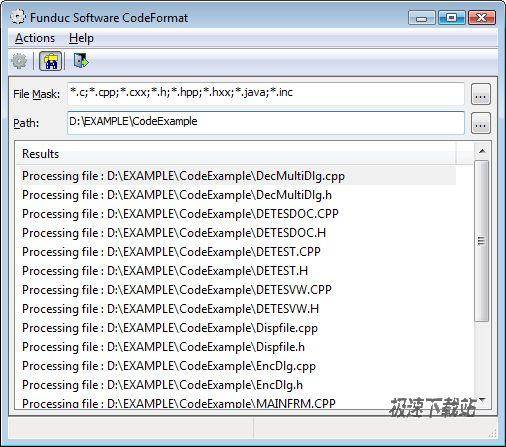
Funduc Software Code Format (FS Code Format) is a free source code reformatter or beautifier for use by programmers. The program has options to determine handling of spacing, tabs, line breaks, indentation, maximum line length, and comments. Options are set at the time of processing and reformatting action is initiated by clicking on the OK button. Backup choices include writing numbered backup files in the original path or output to a different path. The program defaults to processing *.c;*.cpp;*.cxx;*.h;*.hpp;*.hxx;*.java;*.inc files. File Masks should be separated using the ; character. Subdirectories can be processed or not via a toolbar button. You can also drag and drop files into the FS Code Format main dialog, which then triggers the Options dialog so various options can be set before the file is processed.
官方網(wǎng)站:http://www.funduc.com/fscodeformat.htm
Funduc Software Code Format下載地址





- 電腦軟件教程Win7codecs怎么安裝?Shark007 Codecs安裝教...
- 電腦軟件教程視頻格式轉(zhuǎn)換工具XMedia Recode安裝教程
- 電腦軟件教程MediaCoder將本地MP4視頻轉(zhuǎn)換成AVI格式教程
- 電腦軟件教程Win8解碼器Win8codecs中文版安裝教程
- 電腦軟件教程怎么安裝MediaCoder?影音轉(zhuǎn)碼快車安裝教程
- 電腦軟件教程XMedia Recode將MP4視頻轉(zhuǎn)換成MOV格式教程
- 電腦軟件教程SimCode加密TXT文檔教程
- 電腦軟件教程條形碼生成軟件ByteScout BarCode Generato...
- 電腦軟件教程Barcode Generator制作URL二維碼圖片教程
- 電腦軟件教程MediaCoder軟件進(jìn)行音頻轉(zhuǎn)碼操作教程
- 共 0 條評(píng)論,平均 0 分 我來(lái)說(shuō)兩句
- 人氣英雄聯(lián)盟下載官方下載
- 《英雄聯(lián)盟》(簡(jiǎn)稱LOL)是由美國(guó)拳頭游戲(Riot Games)開(kāi)發(fā)、中國(guó)大陸地區(qū)騰訊游戲代理運(yùn)營(yíng)的英雄對(duì)戰(zhàn)MOBA... [立即下載]
- 好評(píng)優(yōu)酷客戶端 7.7.8.5201 官方版
- 你還在用瀏覽器上優(yōu)酷?還要受卡頓的瀏覽器影響,優(yōu)酷也變得卡卡的。想流暢地看完高清視頻?今天極速小編給... [立即下載]


