您的位置:極速下載站 → 電腦軟件 → 系統軟件 → 系統輔助 → Eusing Auto Window Manager
- 軟件介紹
- 下載地址
- 網友評論
自動窗口管理器自動管理任何您指定的窗口。例如,某些Web瀏覽器打開一個非最大化的窗口。使用自動窗口管理器,可以設置這些窗口自動最大化(最小化,正常,最小化到托盤,留在上面)每次他們打開。它適用于幾乎任何程序,包括網頁瀏覽器,記事本等自動窗口管理器保持在系統托盤中運行,因此它保持你的出路,而它的工作原理。自動窗口管理器添加了一些菜單項標準窗口菜單中,通過應用程序的標題欄圖標訪問。命令是:最小化到系統托盤中,始終保持在最前面的窗口,設置窗口的透明度,對齊窗口,縮放窗口。
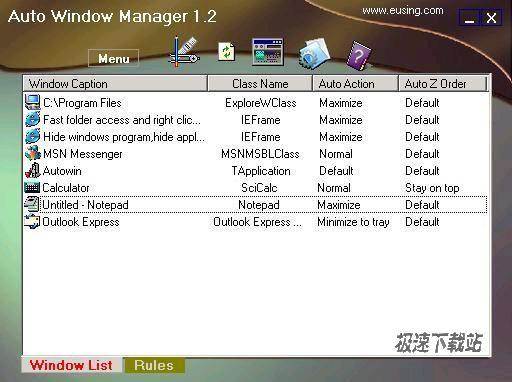
Auto Window Manager automatically manages any window you specify. For instance, some web browsers open up in a non-maximized window. Using Auto Window Manager, you can set those windows to automatically maximize (minimize, normal, minimize to tray, stay on top) every time they opened. It works with almost any program, including web browsers, Notepad, etc. Auto Window Manager stays running in the system tray, so it stays out of your way while it works. Auto Window Manager adds several menu items to standard window menu accessible via application icon in the title bar. The commands are: Minimize to system tray, always keep window on top, Set window transparency, align window, resize window.

237 KB / 2021/11/2

29.81 MB / 2021/10/26

308 KB / 2021/10/26

752 KB / 2021/10/24

514 KB / 2021/10/21

10.54 MB / 2021/10/20

9.38 MB / 2021/10/18

9.06 MB / 2021/10/16
- 共 0 條評論,平均 0 分 我來說兩句
- 人氣英雄聯盟下載官方下載
- 《英雄聯盟》(簡稱LOL)是由美國拳頭游戲(Riot Games)開發、中國大陸地區騰訊游戲代理運營的英雄對戰MOBA... [立即下載]
- 好評WPS Office 2019 11.1.0.8882 官方版
- WPS Office是金山軟件股份有限公司推出的一款辦公軟件。包括WPS文字、WPSb表格、WPS演示WPS數據庫等幾大辦公... [立即下載]